
BIRCH
- Adding documentation for
locally-installed programs
update August 14, 2026
|
BIRCH
- Adding documentation for locally-installed programs |
update August 14, 2026 |
The BIRCH Home Page has links to three indices for all
documentation:
Within the indices, there is a hierarchy of web pages, listing
all programs in a package, all programs in a category, and pages
for each individual program. All of these pages are generated
automatically from two databases: one database for BIRCH core
software ($BIRCH/public_html/birchdocdb/birchdocdb.sqlite), and
another database for locally-installed software
($BIRCH/local/public_html/birchdocdb/birchdocdb.local.sqlite). Changes
to the birchdocdb directory should never be made at your BIRCH
site. Changes should only be made to birchdocdb.local, as
described in this tutorial.
This tutorial gives an example of adding new documentation
with the following steps:
run doc2birchdb.py to create database input for documentation in $local/doc
Documentation files are added to the
$local/doc directory. As a general guideline, it is best to put
files into subdirectories, rather than having large numbers of
files in the main $doc directory. The $doc directory is
organized with a separate directory for each package. For example,
documentation files for the PHYLIP programs are found in the
$doc/Phylip directory. Even when there is only one program and one
documentation file, it is still best to create a separate
directory for that program.
Note: remember to make your files world-readable and directories
world-readable and world-executable.
This tutorial will be done in the directory called 'transactions', found in the containing the birchdocdb.local. To go to that directory, type
cd $BIRCH/local/public_html/birchdocdb/transactions
The
next
step is to create a file called docfiles.tsv, listing the
documentation files for the package. As an example, we will demonstrate the steps
for local installation of a package called 'dummy', which
contains a program called 'bogus'. Documentation and ancillary
datafiles for the bogus program are found, respectively in
$BIRCH/local/doc/dummy and $BIRCH/local/dat/dummy.
doc2birchdb.py $local/doc/dummy
The output shows the details:
path= /home/birch/BIRCH/local/doc/dummy
full_path= /home/birch/BIRCH/local/doc/dummydoc2birchdb.py writes a file transaction for each file in doc/dummy that has a file extension indicating documentation (eg. .txt, .pdf, .docx, .odt and so on. ) The only documentation file in local/doc/dummy is a file called 'bogusman.txt', so docfiles.tsv looks like this:
--------------------------------
INSERT_INTO FILE $local/doc/dummy/bogusman.txtcat /home/birch/BIRCH/local/doc/dummy/docfiles.tsv > adddummy.tsv
Note that the Description
line arbitrarily is set to 'Manual'. Depending on the document,
it might be more appropriate to edit the description to read
'User's guide' or whatever best describes this document.
In this particular case, not all documentation is included in
the files distributed with the package. You can
add links to the adddummy.tsv using a text editor. For
example, a link
to the web site for the dummy package might be written as
--------------------------------
INSERT_INTO FILE http://www.dummy.org
Description Web site
Command $ACE_FILE_LAUNCHER
http://www.dummy.org
;
Note: To ensure that each
File object has a unique name, we use the simple convention of
naming each File
object using the same path
that is found on the Command line.
|
What's going on here? |
Many programs have supplementary datafiles. These might include
things such as scoring matrices for similarity search programs,
alternative genetic codes for translation programs, or even sample
datasets. Data files are added to the $BIRCH/local/dat directory.
As mentioned above for documentation, it is best to have a
different subdirectory for each program or package, rather than
having large numbers of files in the main $BIRCH/local/dat
directory. Even when there is only one program and one data file,
it is still best to create a separate directory for that program.
Note: remember to make your files world-readable and directories
world-readable and world-executable.
The process for making a list of datafiles is similar to that for
documentation. For example, if the datafiles for the dummy package
are in $local/dat/dummy, type
dat2birchdb.py $local/dat/dummy
The terminal output is
path=
/home/birch/BIRCH/local/dat/dummy
full_path= /home/birch/BIRCH/local/dat/dummy
dir_string= $local/dat/dummy
outlocation= /home/birch/BIRCH/local/dat/dummy/datfiles.tsv
dat2birchdb.py: Writing output to
/home/birch/BIRCH/local/dat/dummy/datfiles.tsv
In this case, every file in $local/dat/dummy will be listed in datfiles.tsv. Since not every file is necessarily data, you may wish to delete some File objects before reading datfiles.tsv into birchdocdb.local.
Since there is no way to know in advance what the purpose of each file is, this is a good time to edit the Description lines in datfiles.tsv to be more explicit. For example
--------------------------------
INSERT_INTO FILE
$/local/dat/dummy/bogusdat1.txt
Description datafile
Command $ACE_FILE_LAUNCHER
$local/dat/dummy/bogusdat1.txt
;
--------------------------------
INSERT_INTO FILE
$local/dat/dummy/bogusdat2.txt
Description sample input file
Command $ACE_FILE_LAUNCHER
$local/dat/dummy/bogusdat2.txt
;
--------------------------------
INSERT_INTO FILE
$local/dat/dummy/bogusdat3.txt
Description sample output file
Command $ACE_FILE_LAUNCHER
$local/dat/dummy/bogusdat3.txt
;
Where there are a large number of datafiles, an alternative is to
delete all File objects from datfiles.tsv, and replace
them with a single object that simply points to the directory.
--------------------------------
INSERT_INTO FILE
$local/dat/dummy
Description sample data
Command $ACE_FILE_LAUNCHER
$local/dat/dummy
;
When this link is read by a browser, the browser will show a view
of the entire directory.
Next, append datfiles.tsv to the already-existing adddummy.tsv
cat /home/birch/BIRCH/local/dat/dummy/datfiles.tsv >> adddummy.tsv
(Note the double arrow (>>) operator is used to append output to a file.)
Now that the File objects have been defined in adddummy.tsv, we need to add definitions for the Package and Program objects. The have to be entered by hand, or by copying and modifying other objects.
-------------------------------
-- add a package object
INSERT_INTO PACKAGE dummy
Description definition for dummy package
Category Miscellaneous
Platform L:l:M:m
Installation local
;
-------------------------------
-- add a program object
INSERT_INTO PROGRAM bogus
Description dummy program
Launch interactive bogus
Launch bldna DNA/RNA --> bogus
Documentation $local/doc/dummy/bogusman.txt
Data $local/dat/dummy/bogusdat2.txt
SampleOutput $local/dat/dummy/bogusdat3.txt
Package dummy
Category Miscellaneous
Platform L:l:M:m
Installation local
Several things are worth noting:
Interface - This line says that the program is launched from the command line, and has a graphic interface. Command line arguments taken from the manual pages are included.
Documentation - This line was entered manually, since the file it refers to was not in the main $local/doc/staden directory, but rather in the manual subdirectory.
Sample_input - It makes more sense to put this file here, rather than on the Data line.
Note that to indicate that the dummy package is locally-installed (ie. not part of the BIRCH distribution), Installation is set to 'local'.
The birchdocdb.local database is managed using birchdocdbkit.py.
It is strongly recommended to do a test of your datafile before
commiting the changes to the database. For example, the File,
Program and Package commands
could all be combined into a single file, such as adddummy.example.tsv.
To test this file,
birchdocdbkit.py adddummy.example.tsv
../birchdocdb.local.sqlite
The output details that changes that would be made if the
transactions were committed:
| ***** Obtain parameters from environment
and command line. birchdocdbkit.py: Reading $BIRCH and $BIRCH_PLATFORM environment variables. birchdocdbkit.py: BIRCHPATH set to: /home/birch/BIRCH birchdocdbkit.py: BIRCH_PLATFORM set to: linux-x86_64 ['adddummy.example.tsv', '../birchdocdb.local.sqlite'] IFN: adddummy.example.tsv OFN: DBFN: ../birchdocdb.local.sqlite COMMIT: False ---------- Transaction ---------- ['INSERT_INTO', 'FILE', '$local/doc/dummy/bogusman.txt'] ['Description', 'Manual page'] ['Command', '$ACE_FILE_LAUNCHER', '$local/doc/dummy/bogusman.txt'] ---------- Transaction ---------- ['INSERT_INTO', 'FILE', '$local/dat/dummy/bogusdat1.txt'] ['Description', 'test data'] ['Command', '$ACE_FILE_LAUNCHER', '$local/dat/dummy/bogusdat1.txt'] ---------- Transaction ---------- ['INSERT_INTO', 'FILE', '$local/dat/dummy/bogusdat2.txt'] ['Description', 'sample input data'] ['Command', '$ACE_FILE_LAUNCHER', '$local/dat/dummy/bogusdat2.txt'] ---------- Transaction ---------- ['INSERT_INTO', 'FILE', '$local/dat/dummy/bogusdat3.txt'] ['Description', 'sample output data'] ['Command', '$ACE_FILE_LAUNCHER', '$local/dat/dummy/bogusdat3.txt'] ---------- Transaction ---------- ['INSERT_INTO', 'PACKAGE', 'dummy'] ['Description', 'definition for dummy package'] ['Category', 'Miscellaneous'] ['Platform', 'L:l:M:m'] ['Installation', 'local'] ---------- Transaction ---------- ['INSERT_INTO', 'PROGRAM', 'bogus'] ['Description', 'dummy program'] ['Launch', 'interactive', 'bogus'] ['Launch', 'bldna', 'DNA/RNA --> bogus'] ['Documentation', '$local/doc/dummy/bogusman.txt'] ['Data', '$local/dat/dummy/bogusdat1.txt'] ['SampleInput', '$local/dat/dummy/bogusdat2.txt'] ['SampleOutput', '$local/dat/dummy/bogusdat3.txt'] ['Package', 'dummy'] ['Category', 'Miscellaneous'] ['Platform', 'L:l:M:m'] ['Installation', 'local'] ['INSERT_INTO', 'FILE', '$local/doc/dummy/bogusman.txt'] COMMAND: INSERT INTO File ( Name,Description,Action,PathOrURL) VALUES ("$local/doc/dummy/bogusman.txt","Manual page","$ACE_FILE_LAUNCHER","$local/doc/dummy/bogusman.txt"); ['INSERT_INTO', 'FILE', '$local/dat/dummy/bogusdat1.txt'] COMMAND: INSERT INTO File ( Name,Description,Action,PathOrURL) VALUES ("$local/dat/dummy/bogusdat1.txt","test data","$ACE_FILE_LAUNCHER","$local/dat/dummy/bogusdat1.txt"); ['INSERT_INTO', 'FILE', '$local/dat/dummy/bogusdat2.txt'] COMMAND: INSERT INTO File ( Name,Description,Action,PathOrURL) VALUES ("$local/dat/dummy/bogusdat2.txt","sample input data","$ACE_FILE_LAUNCHER","$local/dat/dummy/bogusdat2.txt"); ['INSERT_INTO', 'FILE', '$local/dat/dummy/bogusdat3.txt'] COMMAND: INSERT INTO File ( Name,Description,Action,PathOrURL) VALUES ("$local/dat/dummy/bogusdat3.txt","sample output data","$ACE_FILE_LAUNCHER","$local/dat/dummy/bogusdat3.txt"); ['INSERT_INTO', 'PACKAGE', 'dummy'] COMMAND: INSERT INTO Package ( Name,Description,Installation) VALUES ("dummy","definition for dummy package","local"); COMMAND: INSERT INTO PkgCat ( Package,Category) VALUES ("dummy","Miscellaneous"); COMMAND: INSERT INTO PkgPlat ( Package,Platform) VALUES ("dummy","linux-x86_64"); COMMAND: INSERT INTO PkgPlat ( Package,Platform) VALUES ("dummy","linux-arm64"); COMMAND: INSERT INTO PkgPlat ( Package,Platform) VALUES ("dummy","osx-x86_64"); COMMAND: INSERT INTO PkgPlat ( Package,Platform) VALUES ("dummy","macos-arm64"); ['INSERT_INTO', 'PROGRAM', 'bogus'] COMMAND: INSERT INTO Program ( Name,Description,Installation) VALUES ("bogus","dummy program","local"); COMMAND: INSERT INTO ProgLaunch ( Program,ComType,Command) VALUES ("bogus","interactive","bogus"); COMMAND: INSERT INTO ProgLaunch ( Program,ComType,Command) VALUES ("bogus","bldna","DNA/RNA --> bogus"); COMMAND: INSERT INTO ProgDoc ( Program,Documentation) VALUES ("bogus","$local/doc/dummy/bogusman.txt"); COMMAND: INSERT INTO ProgDat ( Program,Data) VALUES ("bogus","$local/dat/dummy/bogusdat1.txt"); COMMAND: INSERT INTO ProgSampleInp ( Program,SampleInput) VALUES ("bogus","$local/dat/dummy/bogusdat2.txt"); COMMAND: INSERT INTO ProgSampleOut ( Program,SampleOutput) VALUES ("bogus","$local/dat/dummy/bogusdat3.txt"); COMMAND: INSERT INTO PkgProg ( Package,Program) VALUES ("dummy","bogus"); COMMAND: INSERT INTO ProgCat ( Program,Category) VALUES ("bogus","Miscellaneous"); COMMAND: INSERT INTO ProgPlat ( Program,Platform) VALUES ("bogus","linux-x86_64"); COMMAND: INSERT INTO ProgPlat ( Program,Platform) VALUES ("bogus","linux-arm64"); COMMAND: INSERT INTO ProgPlat ( Program,Platform) VALUES ("bogus","osx-x86_64"); COMMAND: INSERT INTO ProgPlat ( Program,Platform) VALUES ("bogus","macos-arm64"); birchdocdbkit.py: Successfully completed execution |
At this point, no changes have been made to the database. This is
your opportunity to correct errors in the input, if any. Once the
input file is correct, re-run the command with the --commit option
to commit the changes into the database
birchdocdbkit.py adddummy.example.tsv
../birchdocdb.local.sqlite --commit
The birchdocd.local database can be directly viewed and edited
using letos:
letos
$BIRCH/local/public_html/birchdocdb/birchdocdb.local.sqlite
You can also open the local database using birchadmin -->
Documentation --> lbirchdocdb
The database might look something like this:
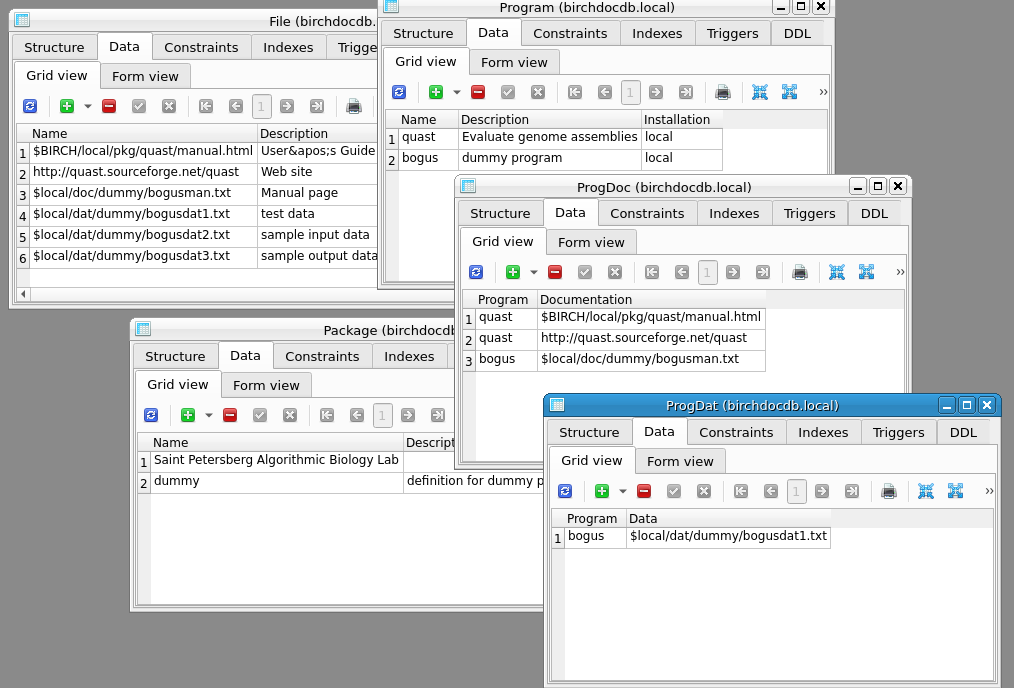
At this point, the new data objects have not been incorporated
into the BIRCH web documentation. The final step is to Type
sql2htmldoc.py
The sql2htmldoc.py script reads both the core birchdocdb database
and your birchdocdb.local database, and creates web documentation
for the merged data. For an example of how the documentation
might be represented at a local BIRCH site, click here.
If a file is not readable from the web documentation, the most
likely reason is that the file path is incorrect. This shouldn't
happen, but there are occasions where symbolic links might give
the wrong file path. You could quit birchdocdb.local without
saving at this point, and edit the docfiles.tsv file to give the
correct paths. Usually all paths can be changed in one step using
a global Replace command. Alternatively, you could change each
command line directly in the database using sqlitestudio. Keep in
mind that changes to the database require re-running
sql2htmldoc.py to take effect.
Since the dummy package is solely for this tutorial, it should be removed from birchdocdb.local.
| -------------------------------- DELETE FILE $local/doc/dummy/bogusman.txt ; -------------------------------- DELETE FILE $local/dat/dummy/bogusdat1.txt ; -------------------------------- DELETE FILE $local/dat/dummy/bogusdat2.txt ; -------------------------------- DELETE FILE $local/dat/dummy/bogusdat3.txt ; -------------------------------- DELETE PROGRAM bogus ; -------------------------------- DELETE PACKAGE dummy ; |
| ***** Obtain parameters from environment
and command line. birchdocdbkit.py: Reading $BIRCH and $BIRCH_PLATFORM environment variables. birchdocdbkit.py: BIRCHPATH set to: /home/birch/BIRCH birchdocdbkit.py: BIRCH_PLATFORM set to: linux-x86_64 ['rmdummy.example.tsv', '../birchdocdb.sqlite'] IFN: rmdummy.example.tsv OFN: DBFN: ../birchdocdb.sqlite COMMIT: True ---------- Transaction ---------- ['DELETE ', ' FILE ', '$local/doc/dummy/bogusman.txt'] ---------- Transaction ---------- ['DELETE ', ' FILE ', '$local/dat/dummy/bogusdat1.txt'] ---------- Transaction ---------- ['DELETE ', ' FILE ', '$local/dat/dummy/bogusdat2.txt'] ---------- Transaction ---------- ['DELETE ', ' FILE ', '$local/dat/dummy/bogusdat3.txt'] ---------- Transaction ---------- ['DELETE ', ' PROGRAM', 'bogus'] ---------- Transaction ---------- ['DELETE ', ' PACKAGE', 'dummy'] ['DELETE ', ' FILE ', '$local/doc/dummy/bogusman.txt'] ['DELETE ', ' FILE ', '$local/dat/dummy/bogusdat1.txt'] ['DELETE ', ' FILE ', '$local/dat/dummy/bogusdat2.txt'] ['DELETE ', ' FILE ', '$local/dat/dummy/bogusdat3.txt'] ['DELETE ', ' PROGRAM', 'bogus'] ['DELETE ', ' PACKAGE', 'dummy'] birchdocdbkit.py: Successfully completed execution |
Please send suggestions of
comments regarding this page to frist@cc.umanitoba.ca